



Sprites
Santa Says fully supports MiniMessage formatting, which means you are not limited to standard Minecraft colors. You can use Custom Sprites to render high-quality icons, items, and UI elements directly in the chat, scoreboard, boss bar, and titles.
What is a Sprite?
Section titled “What is a Sprite?”A sprite is a custom image or icon mapped to a specific text tag. When the plugin processes your messages, it replaces these tags with the corresponding visual icon.
Syntax
Section titled “Syntax”The general syntax for using a sprite is:
<sprite:[category]:[id]>
- category: The group the sprite belongs to (e.g.,
items,blocks,gui,particles,decorated_pot,map_decorations). - id: The specific name of the icon (e.g.,
item/diamond,block/dirt).
Usage Examples
Section titled “Usage Examples”You can use sprite tags anywhere messages are configured (in messages.yml, scoreboard.yml, bossbar.yml, or in-game commands).
Chat Messages
Section titled “Chat Messages”Enhance simple chat messages with item icons.
player-joined: "<gray>Welcome! Here is a <reset><sprite:items:item/diamond> <gray>for you!"
Scoreboards
Section titled “Scoreboards”Make your scoreboard look like a modded UI using custom icons.
title: "<sprite:items:item/snowball> <#FFC800><bold>SANTA SAYS <reset><sprite:items:item/snowball>"lines: - "" - " <gray>Do it only if Santa says!" - "" - " <sprite:items:item/clock_00> <gray>Time Left:" - " <yellow><bold>%formatted_timer%</bold>" - "" - " <sprite:items:item/gold_nugget> <gray>Coins:" - " <gold><bold>0</bold>" - "" - " <sprite:items:item/emerald> <gray>Round:" - " <aqua><bold>1</bold>" - "" - " <sprite:gui:icon/ping_5> <gray>Players:" - " <green><bold>1</bold>" - " <sprite:gui:toast/system><sprite:gui:toast/system><sprite:gui:toast/system><sprite:gui:toast/system><sprite:gui:toast/system><sprite:gui:toast/system><sprite:gui:toast/system><sprite:gui:toast/system><sprite:gui:toast/system><sprite:gui:toast/system><sprite:gui:toast/system><sprite:gui:toast/system><sprite:gui:toast/system><sprite:gui:toast/system><sprite:gui:toast/system><sprite:gui:toast/system>"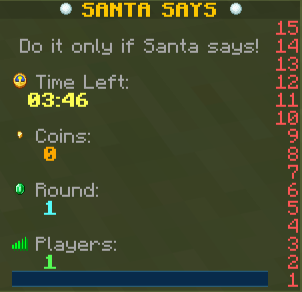
Boss Bars
Section titled “Boss Bars”Add flair to your game status bars.
states:# The stage where players are waiting in the lobby for the game to start.waiting:title: "<gradient:#ff3b3b:#ff7a7a><sprite:items:item/nether_star> <sprite:items:item/nether_star> <sprite:items:item/nether_star></gradient> <gradient:#ff3b3b:#ff7a7a><bold>SANTA</gradient> <gradient:#ff7a7a:#ff3b3b><bold>SAYS</gradient> <yellow><bold>by <aqua><bold>DESPICAL <gradient:#ff7a7a:#ff3b3b><sprite:items:item/nether_star> <sprite:items:item/nether_star> <sprite:items:item/nether_star></gradient>"overlay: PROGRESScolor: PINK
Available Sprite Categories
Section titled “Available Sprite Categories”Here is a list of common sprite categories available in the default resource pack.
🧱 Blocks (blocks)
Section titled “🧱 Blocks (blocks)”Use block textures directly in your text.
| Example | Description |
|---|---|
<sprite:blocks:block/gray_wool> | Renders a Gray Wool block. |
<sprite:blocks:block/iron_block> | Renders an Iron Block. |
<sprite:blocks:block/spruce_door_bottom> | Renders the bottom half of a Spruce Door. |
🏺 Decorated Pot (decorated_pot)
Section titled “🏺 Decorated Pot (decorated_pot)”Detailed pottery patterns for advanced visuals.
| Example | Description |
|---|---|
<sprite:decorated_pot:entity/decorated_pot/miner_pottery_pattern> | Renders the Miner pottery pattern. |
<sprite:decorated_pot:entity/decorated_pot/mourner_pottery_pattern> | Renders the Mourner pottery pattern. |
<sprite:decorated_pot:entity/decorated_pot/burn_pottery_pattern> | Renders the Burn pottery pattern. |
🖥️ GUI (gui)
Section titled “🖥️ GUI (gui)”Standard Minecraft interface elements, useful for recreating menu looks.
| Example | Description |
|---|---|
<sprite:gui:container/beacon/confirm> | Renders the Beacon confirm (check) button. |
<sprite:gui:container/furnace/burn_progress> | Renders the Furnace burn flame. |
<sprite:gui:container/villager/trade_arrow> | Renders the Villager trade arrow. |
📦 Items (items)
Section titled “📦 Items (items)”Icons for vanilla Minecraft items, perfect for referencing game objects.
| Example | Description |
|---|---|
<sprite:items:item/diamond> | Renders a standard Diamond icon. |
<sprite:items:item/acacia_boat> | Renders an Acacia Boat icon. |
<sprite:items:item/bamboo_door> | Renders a Bamboo Door icon. |
🗺️ Map Decorations (map_decorations)
Section titled “🗺️ Map Decorations (map_decorations)”Icons typically found on maps, useful for location markers.
| Example | Description |
|---|---|
<sprite:map_decorations:desert_village> | Renders a Desert Village map icon. |
<sprite:map_decorations:red_banner> | Renders a Red Banner map icon. |
<sprite:map_decorations:target_point> | Renders a Target Point (X) icon. |
✨ Particles (particles)
Section titled “✨ Particles (particles)”Particle effect textures.
| Example | Description |
|---|---|
<sprite:particles:big_smoke_7> | Renders a large smoke particle frame. |
<sprite:particles:sculk_charge_pop_2> | Renders a sculk charge pop particle. |
<sprite:particles:sonic_boom_12> | Renders a sonic boom particle frame. |
Troubleshooting
Section titled “Troubleshooting”Only seeing ”□” boxes?
Section titled “Only seeing ”□” boxes?”If you or your players see square boxes instead of icons:
- Verify that the namespace/ID in the tag matches exactly (tags are case-sensitive).
- Ensure the player has accepted the Resource Pack.
Icons are too large/small?
Section titled “Icons are too large/small?”The sprites are optimized for the default Minecraft font. If you are using a custom font or scaling, they might appear misaligned.